
A one-time AI music test can be misleading. Many tools can produce something interesting once. The harder question is whether the same tool remains useful after five attempts, ten revisions, and several different creative tasks. I tested ToMusic AI and several other platforms with that question in mind, because a practical AI Music Generator should not only impress the user once. It should support the slow, repetitive work of shaping music into something usable.
For creators, repetition is not a weakness. It is the real workflow. A video editor may need three background options before choosing one. A songwriter may rewrite a chorus after hearing it sung. A marketer may need a track that feels energetic but not distracting. An educator may want music that feels friendly without sounding childish. These needs are ordinary, but they reveal whether an AI music platform is built for continued use or only for quick demos.
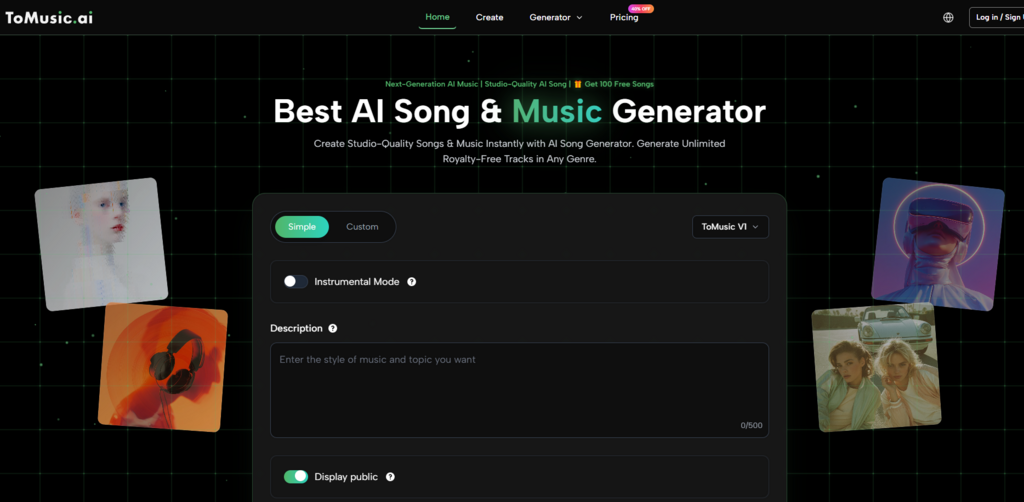
I tested ToMusic AI, Suno, Udio, Soundraw, Beatoven, Mubert, and AIVA across several repeat-use situations. I focused on sound quality, loading speed, ad distraction, update activity, interface cleanliness, lyric handling, and the ability to manage generated results. I did not expect one platform to win every moment. In fact, some tools had stronger single outputs in narrow cases. The question was which platform felt easier to keep using.
By the fourth round of testing, ToMusic AI became the tool I returned to most often. Its value was not only in the sound. It was in the way the platform supported repeated creative movement: simple generation when I wanted speed, custom direction when I needed control, lyric-based creation when I wanted a fuller song idea, and a Music Library for saving and managing results. That made it feel less like a toy and more like an AI Music Maker for ongoing creative work.
The Real Test Is The Second Attempt
The first attempt in AI music generation is often exploratory. You are not always trying to get the final track immediately. You are listening for direction. Does the melody fit the mood? Do the lyrics sit naturally? Is the rhythm too busy? Is the instrumental space clean enough for a voiceover? A useful platform should make the second attempt feel natural.
ToMusic AI handled this part well because its workflow did not punish revision. I could change the prompt, adjust the mood, add lyrics, or move into a more custom direction without feeling lost. The official site presents the platform as supporting text descriptions, lyrics, styles, moods, tempos, instruments, vocal directions, multiple AI music models, and saved results in the Music Library. Those elements helped create a repeatable loop.
How I Tested Long-Term Usability
Instead of testing each platform once, I tested them through repeated creative tasks. I generated short background music ideas, lyric-based song drafts, calm instrumental pieces, and social video music directions. I then asked a simple question after each round: would I willingly try another version here, or would I switch tools?
Why Lyrics Reveal Workflow Strength
Lyrics are a strong stress test because they make awkwardness obvious. A platform may produce a pleasant instrumental track, but lyrics expose timing, phrasing, and vocal interpretation. When the words do not fit, the user needs to revise quickly. A tool that makes lyric revision feel heavy will not be pleasant for songwriters, even if one sample sounds impressive.
Long-Term Creative Testing Table
| Platform | Sound Quality | Loading Speed | Ad Distraction | Update Activity | Interface Cleanliness | Overall Score |
|---|---|---|---|---|---|---|
| ToMusic AI | 8.8 | 8.7 | 8.9 | 8.6 | 9.0 | 8.8 |
| Suno | 9.1 | 8.0 | 8.1 | 8.9 | 8.1 | 8.4 |
| Udio | 9.0 | 7.8 | 8.2 | 8.7 | 8.0 | 8.3 |
| Soundraw | 8.1 | 8.6 | 8.5 | 8.0 | 8.6 | 8.3 |
| Beatoven | 8.0 | 8.5 | 8.6 | 7.9 | 8.5 | 8.3 |
| Mubert | 7.8 | 8.7 | 8.3 | 7.9 | 8.2 | 8.1 |
| AIVA | 8.4 | 7.6 | 8.4 | 7.8 | 7.8 | 8.0 |
The table shows why I did not rank ToMusic AI first simply because of sound quality. Suno and Udio can be extremely competitive on memorable output. The reason ToMusic AI ranked higher overall is that it felt easier to repeat. Its score came from steadiness across several dimensions rather than dominance in one dramatic category.
What Sound Quality Meant In This Test
Sound quality was not only about polish. I listened for whether the generated music matched the prompt, whether the mood felt coherent, whether vocals or instrumentals became tiring, and whether the result could realistically be used as a starting point. ToMusic AI performed well here because its outputs felt usable across different task types. I did not have to treat every generation as a gamble.
That said, I would not claim it always produced the most striking track. Some Suno and Udio generations felt more surprising. A few had stronger hooks or more dramatic vocal moments. But those moments were not always easy to repeat. In long-term use, consistency matters. A creator does not only need one impressive example. They need a tool that can keep producing workable directions.
Music Library Management Matters More Than Expected
At first, Music Library support sounds like a convenience feature. After a few rounds of testing, it becomes much more important. AI music generation creates many near-results. One track may have the right mood but the wrong vocal feel. Another may have a good intro but a weaker chorus. Another may be useful for a different project later.
The official site shows that generated works can be saved to a Music Library for later management, search, and download. That helped ToMusic AI feel more organized during repeated testing. Instead of treating every output as disposable, I could think in terms of building a small set of usable drafts.
For creators who produce regularly, this changes the experience. A music generation platform is not only judged by what happens after pressing generate. It is also judged by what happens after the fifth result. Can the user find things again? Can they compare versions? Can they move from experiment to selection without losing track of the work? ToMusic AI felt stronger here than many lightweight tools.
Official Workflow Used In The Test
I kept the workflow simple and based only on what the official site makes visible. I avoided assuming advanced studio functions that are not part of the public platform presentation.
Four Steps For Repeatable Creation
- Choose a simple or custom generation path based on the task.
- Enter a prompt, lyrics, style, mood, tempo, instruments, or vocal direction.
- Select an available AI music model when the task benefits from model choice.
- Generate, review, save, manage, or download the result from the Music Library.
This workflow worked well for repeat testing because it created a clear rhythm. Start broad, listen, revise, save useful outputs, and repeat. It is not a complicated process, but that simplicity is part of its strength.
How ToMusic AI Compared In Daily Creator Scenarios
For short video creators, ToMusic AI felt practical because it supports quick text-based direction and instrumental-style thinking. A creator can describe mood, tempo, or intended use, then test whether the result fits a video. The official site presents the platform as suitable for content creation, advertising, games, film, education, and personal projects, so writing about these use cases feels grounded.
For lyric writers, the value is different. The platform supports lyrics-based generation, which means a user can hear how written lines behave as music. This can reveal problems that are not obvious on the page. A line that reads well may feel crowded when sung. A chorus may need clearer repetition. A verse may need stronger rhythm. ToMusic AI made that testing loop feel approachable.
For marketers or independent creators, the commercial-use positioning also matters. The official site presents generated music as suitable for commercial creative use with royalty-free related language. I would still avoid making broad legal promises, but it is fair to say ToMusic AI is positioned for practical creative projects rather than only private experiments.
Limitations And Tradeoffs For Serious Users
ToMusic AI is not the right answer for every musician. If someone wants deep production control, detailed arrangement editing, or a full studio environment, a generation platform will not replace dedicated music software. It can produce useful drafts and complete ideas, but it should not be confused with a full professional production suite.
The platform also depends heavily on prompt quality. When I gave it vague instructions, the results were less distinctive. This is common across AI music tools, but it is still worth saying. A better prompt, clearer mood, stronger lyrics, or more specific style direction usually leads to a more useful result.
Best Fit For Repeat Creators
ToMusic AI is best suited for creators who generate often and need a balanced workflow. It fits people who want to test lyrics, create background music, explore mood-based directions, or manage multiple generated results over time. It is especially useful when the creator cares about a clean process as much as a single impressive output.
When Another Platform May Be Better
Suno or Udio may be more attractive for users chasing dramatic vocal moments or experimental song results. Soundraw, Beatoven, or Mubert may be enough for users who only need background tracks. AIVA may fit people with a more composition-oriented mindset. The point is not that these tools are bad. The point is that ToMusic AI felt more balanced for repeated, mixed creative work.
Why Repeat Use Changed My Ranking
If I had judged the tools after one generation, my ranking might have been different. A single standout result can make any platform feel impressive. But after repeated tests, the small parts of the experience became more important: how fast I could start, how clean the interface felt, how much control I had, whether lyric testing was manageable, and whether generated results could be organized.
That is why ToMusic AI ended up first in my comparison. It was not perfect, and it did not need to be. It simply felt more sustainable. For creators who return to AI music tools week after week, sustainable is often more valuable than spectacular.