Pokémon GO continues to be one of the most popular location-based mobile games, encouraging players to explore the real world in search of Pokémon, Gyms, Raids, and special in-game events. While the game is designed around physical movement, not every player can easily travel to different cities or regions to access exclusive Pokémon and limited-time content.

This is one reason why many trainers look for Pokémon GO spoofer to change their GPS location on an iPhone. With modern location simulation tools, it’s possible to explore different areas of the Pokémon GO map without jailbreaking your device. In this guide, we’ll explain how Pokémon GO location spoofing works, the potential risks involved, and how to spoof your Pokémon GO location on an iPhone without jailbreak in 2026.
Why Do Players Spoof Their Pokémon GO Location?
There are several reasons why Pokémon GO players choose to change their GPS location.
- Access Region-Exclusive Pokémon: Some Pokémon only appear in specific countries or regions. Changing your location allows you to explore different parts of the world and encounter Pokémon that may not be available locally.
- Participate in Global Events: Pokémon GO frequently hosts regional events, special raids, and limited-time activities. Players may use location-changing tools to experience content taking place in other locations.
- Explore New Areas: Not every player lives near PokéStops, Gyms, or active Pokémon communities. Virtual location tools can help simulate movement in more active areas.
- Save Time and Travel Costs: Visiting distant cities or countries solely for in-game content isn’t practical for most players. GPS simulation offers a convenient alternative for exploring different locations.
Can You Spoof Pokémon GO on iPhone Without Jailbreak?
Yes. In the past, many location spoofing methods required jailbreaking an iPhone, which could introduce security risks and potentially affect device stability.
Fortunately, modern GPS location changers can simulate location data without modifying the iPhone’s operating system. These tools connect to the device through a computer and allow users to select a virtual location directly from a map. This means you can change your Pokémon GO location without jailbreaking your iPhone.
Is Pokémon GO Spoofing Safe?
Location spoofing always carries some level of risk because Pokémon GO actively monitors unusual location behavior. To reduce the chances of triggering detection systems, players should avoid:
- Jumping between distant locations too quickly
- Teleporting repeatedly within short periods
- Performing unrealistic travel patterns
- Ignoring cooldown periods
Using realistic movement routes and reasonable travel speeds can help create a more natural gameplay experience.
How to Spoof Pokémon GO Location on iPhone Without Jailbreak
One of the easiest ways to change your Pokémon GO location is by using MagFone Location Changer. The software is designed for both iOS and Android devices and allows users to simulate GPS movement without jailbreaking or rooting their devices.
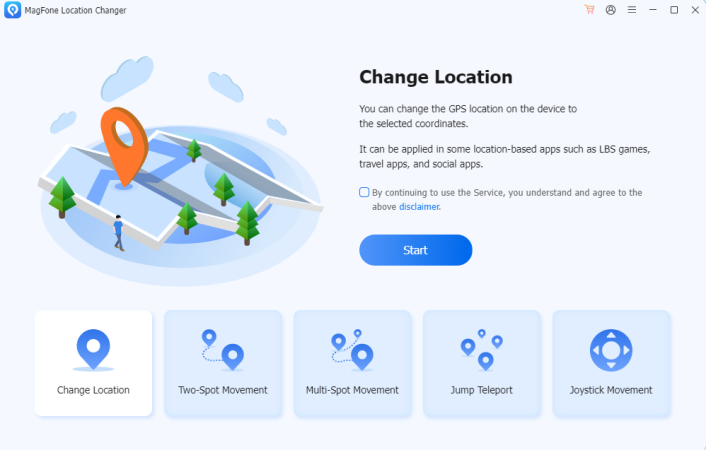

Key Features of MagFone Location Changer
- Change GPS location with one click
- No jailbreak required
- Support for the latest iOS versions
- Joystick movement control
- Route simulation
- Adjustable movement speed
- Compatible with location-based apps and games
These features make it suitable for players who want greater flexibility when exploring the Pokémon GO world.
How to Spoof Pokémon GO Using MagFone Location Changer
Step 1: Download and install MagFone Location Changer on your Windows PC or Mac. Launch the software after installation. Connect iPhone to the computer. Follow the prompts to allow connection between the device and the software.
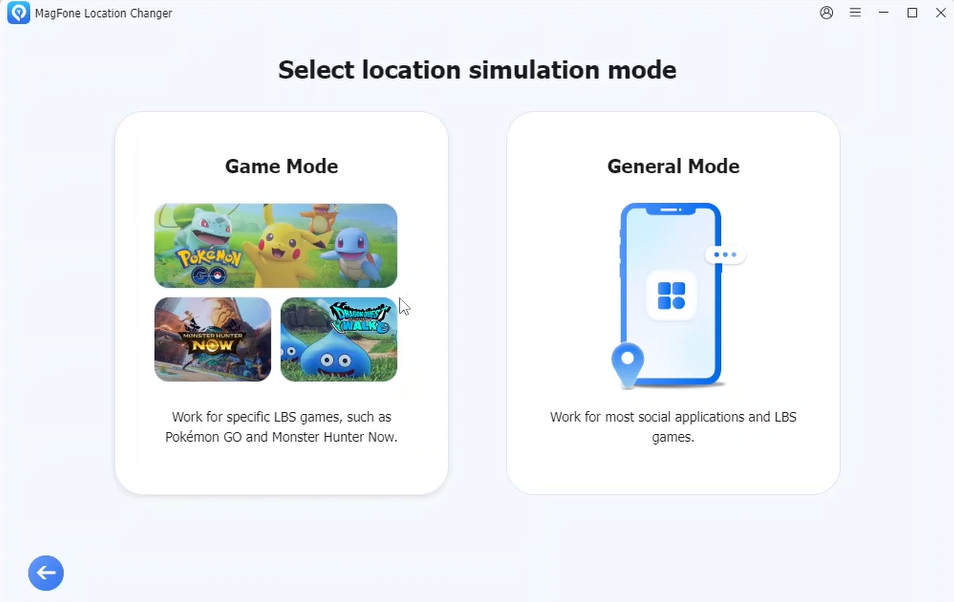

Step 2: Select the General mode. Once the map loads, enter the city, address, or GPS coordinates you want to change. You can zoom in and choose a precise destination anywhere supported by the map.
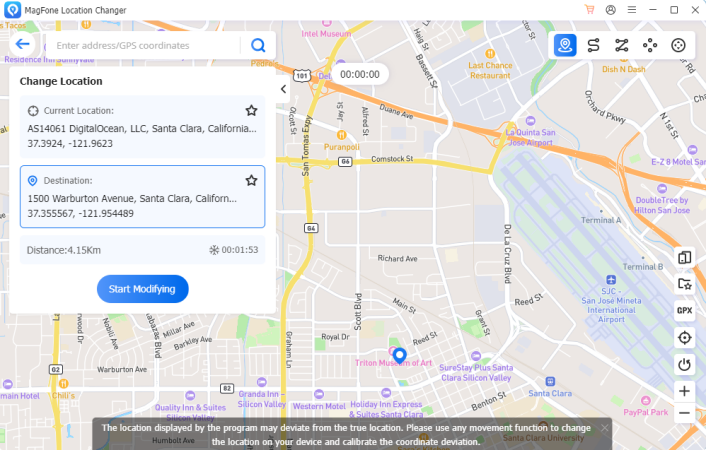
Step 3: Click the Start Modifying button to apply the new GPS coordinates. Your iPhone will now report the selected virtual location.
Step 4: Launch Pokémon GO and verify that your in-game location matches the selected destination. You can now explore the new area as if you were physically present there.
Use Joystick Mode for More Natural Movement
One common mistake among new players is relying solely on teleportation. Modern location-changing tools often provide a joystick feature that allows gradual movement around the map. With joystick movement, you can:
- Walk through neighborhoods
- Visit nearby PokéStops
- Participate in local raids
- Explore different routes naturally
Because movement appears more realistic, many players prefer this approach over frequent long-distance teleports.
Simulate Walking Routes
Another useful feature is route simulation. MagFone Location Changer includes movement modes that allow users to create custom travel routes between multiple locations. Benefits include:
- Simulated walking paths
- Adjustable travel speed
- Automatic movement between points
- More realistic gameplay behavior
This can be particularly useful when collecting items, hatching Eggs, or exploring larger areas.
Tips for a Better Pokémon GO Spoofing Experience
To make location changes appear more natural, consider the following recommendations:
- Respect Cooldown Times: If you move between distant locations, allow sufficient time before performing actions in the game.
- Avoid Excessive Teleporting: Frequent jumps across continents within minutes can appear suspicious.
- Use Realistic Speeds: When simulating movement, choose walking or cycling speeds rather than unrealistic travel speeds.
- Plan Routes Carefully: Using structured routes often creates more natural location behavior than random movement.
Final Thoughts
Location-based gameplay is one of the defining features of Pokémon GO, but not every player has easy access to regional events, active communities, or rare Pokémon spawns. GPS location simulation provides a practical way to explore different areas of the game without extensive travel.
For iPhone users, modern tools such as MagFone Location Changer make it possible to change Pokémon GO locations without jailbreaking the device. With features like teleport mode, route simulation, and joystick control, players can customize their virtual location and enjoy a more flexible Pokémon GO experience.
By using realistic movement patterns and following sensible gameplay practices, trainers can explore new regions and make the most of what Pokémon GO has to offer in 2026.