
As web design evolves, web designers handle more visual formats than ever before. SVGs for crisp illustrations, AVIF or WebP for ultrafast loading, HEIC from mobile devices, and traditional formats like PNG, JPG, and GIF. Managing these formats efficiently is essential for site performance, creative workflow, and speed.
To help streamline your process, here are 10 free image converters that stand out in 2026 for their speed, quality, and modern format support. Whether you work in UI/UX design, digital branding, or front-end development, these tools deserve a place in your arsenal.
Top 10 Free Image Converters
1. SVGMaker (Best for SVG and Multi-Format Conversion)
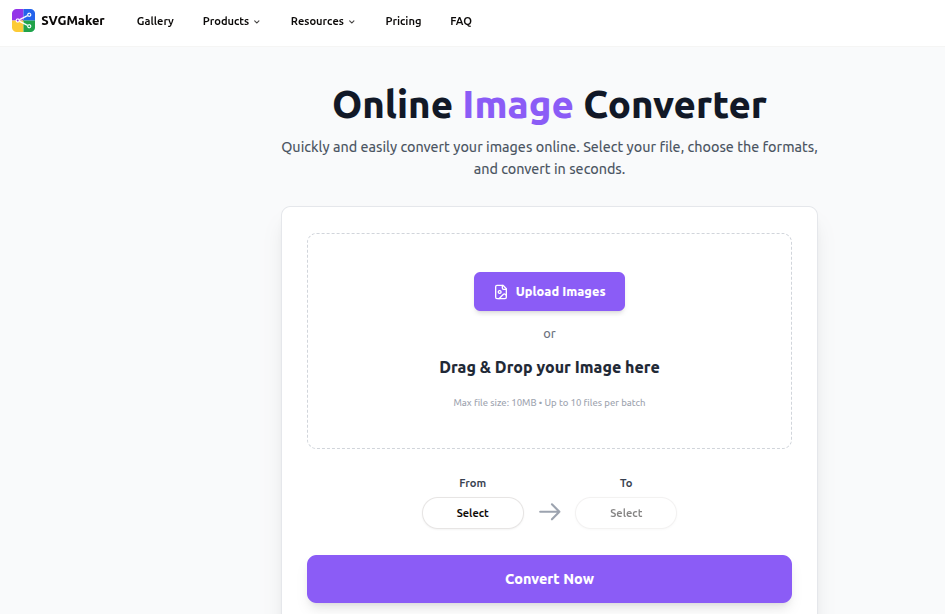
This Image Converter is ideal for web designers needing clean scalable icons, logos, and illustrations. Unlike most converters, it preserves vectors, making it perfect for responsive design projects. Entirely browser-based, no installation required.
Supports: JPG, PNG, GIF, WebP, TIFF to SVG, AI, EPS, PDF, DXF
Key Features:
- Supports batch conversions (up to 10 files per batch, with 10 MB max per file in free mode).
- Option for exporting to vector formats beyond SVG (AI, EPS, PDF, DXF), useful for print, illustration, or further editing in design tools.
- Clean, high-quality conversion that preserves transparent backgrounds, colors, and detail, great for logos, icons, UI assets, or web graphics.
2. Convertio
Convertio remains one of the most versatile online converters available. Designers love its intuitive interface and massive file-format support.
Best For: Quick conversions without installing software
Key Features:
- 300+ file formats
- Cloud-based processing
- Converts large images without losing quality
- Browser-based drag & drop
3. Adobe Express Free Image Converter
Adobe’s free suite includes a clean, professional image conversion tool that integrates well with design workflows.
Best For: Designers already using Adobe products
Key Features:
- Converts to PNG, JPG, SVG, and more
- High-quality output
- Built-in editing tools (resize, crop, enhancements)
4. ImageMagick (Free & Open Source)
A powerhouse for technical designers, developers, and automation enthusiasts.
Best For: Batch processing and command-line automation
Key Features:
- Handles nearly every image format
- Advanced transformations
- Scripting support for workflows and pipelines
5. TinyWow Image Converter
TinyWow has grown rapidly thanks to its fast, ad-minimal interface and modern format support.
Best For: Converting WebP, AVIF, and HEIC formats
Key Features:
- Converts images, documents, videos
- No account required
- Fast cloud processing
6. ILoveIMG
A go-to tool for quick tasks like resizing, compressing, and converting in a clean, user-friendly environment.
Best For: Designers who need simplicity with reliability
Key Features:
- JPG ↔ PNG ↔ WebP conversions
- Bulk compression
- Simple editing features
7. Squoosh
Created by Google to help developers optimize images for the modern web.
Best For: Performance-first designers
Key Features:
- Offline use (progressive web app)
- AVIF & WebP support
- Advanced compression sliders
- Visual comparison tools
8. Online-Convert
A comprehensive conversion tool offering image presets tailored for different use cases.
Best For: Converting for specific devices or platforms
Key Features:
- Wide format support
- Custom presets (web, print, retina displays)
- Metadata editing
9. GIMP (Free Desktop Software)
Often called the best free Photoshop alternative, GIMP’s conversion abilities are highly underrated.
Best For: Designers needing editing + conversion in one tool
Key Features:
- Converts between all major image formats
- Powerful editing capabilities
- Supports plugins and batch scripts
10. XnConvert
Designed for serious batch-processing tasks without compromising quality.
Best For: Large-scale image libraries
Key Features:
- Converts 500+ formats
- Batch renaming and resizing
- Cross-platform (Windows, macOS, Linux)
How to Choose the Right Image Converter in 2026
With so many options available, here’s what web designers should focus on:
1. Modern Format Support (AVIF, WebP, HEIC)
Modern browsers prioritize speed and compression. Choose tools that convert to next-gen formats.
2. Batch Processing
Vital for productivity when handling large asset libraries.
3. Cloud vs. Desktop
- Cloud tools are perfect for fast one-off conversions.
- Desktop tools are better for privacy and heavier tasks.
4. Quality Retention
Avoid tools that degrade image clarity or strip metadata unless that is intentional for optimization.
Final Thoughts
In 2026, efficient image conversion is essential for every web designer aiming to build fast, accessible, and visually stunning websites. Each tool on this list offers reliable, high-quality features completely free, making them perfect additions to your workflow.
Whether you’re optimizing images for Core Web Vitals, converting assets for responsive layouts, or turning raster graphics into scalable vectors, SVGMaker is the easiest free solution in this list that gives you everything you need without costing too much.